GymTracker
A workout log for iPhone and iPad. Log your sets, plan your weeks and see your progress. Everything you enter stays on your phone.
GymTracker: Workout Notebook · For iPhone and iPad
This opens your email app. We will write once, when the app is out.
Screens
From the app, filled with sample training data.
-
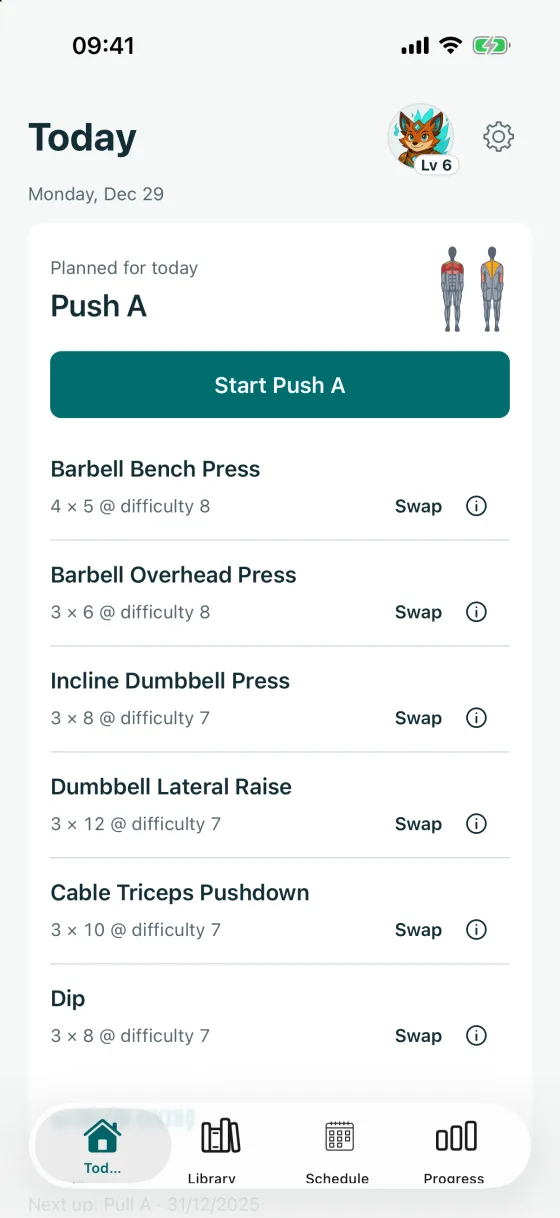
Today: the planned workout -
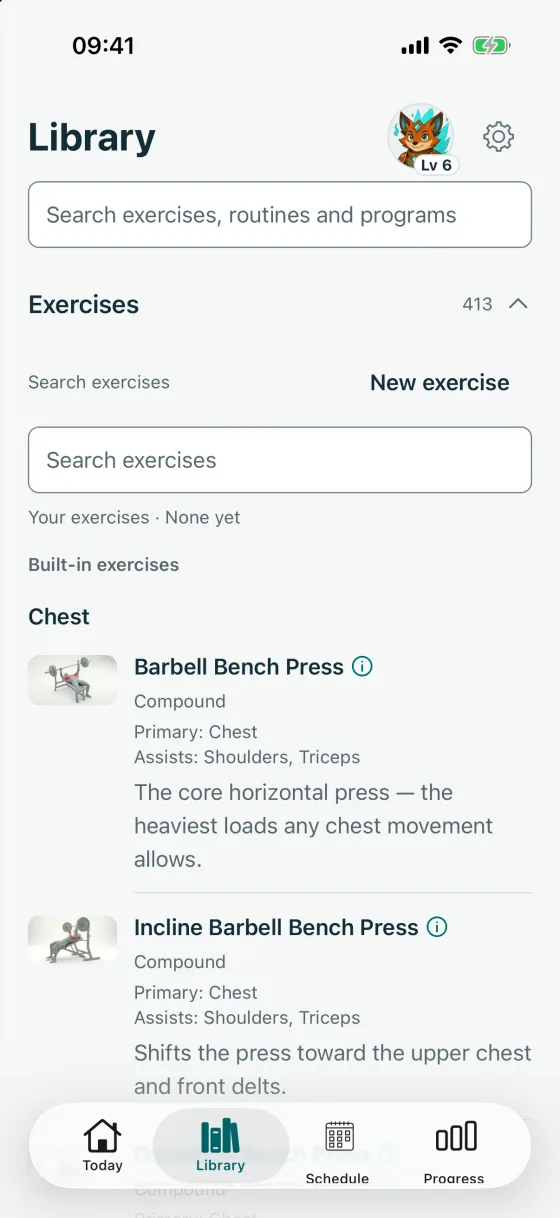
Library: the exercises -
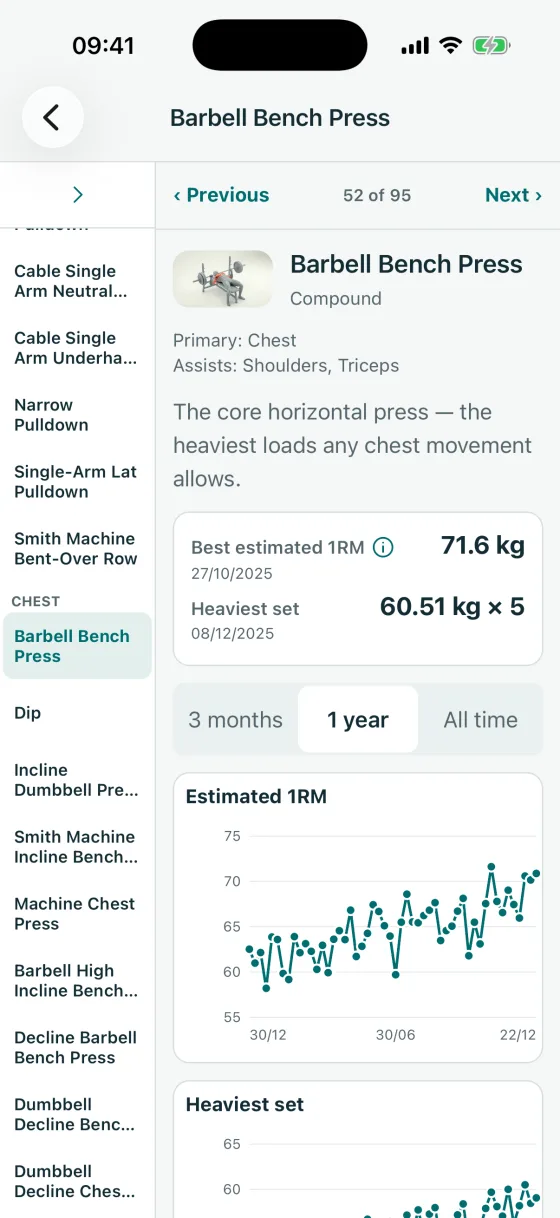
An exercise’s records and charts -
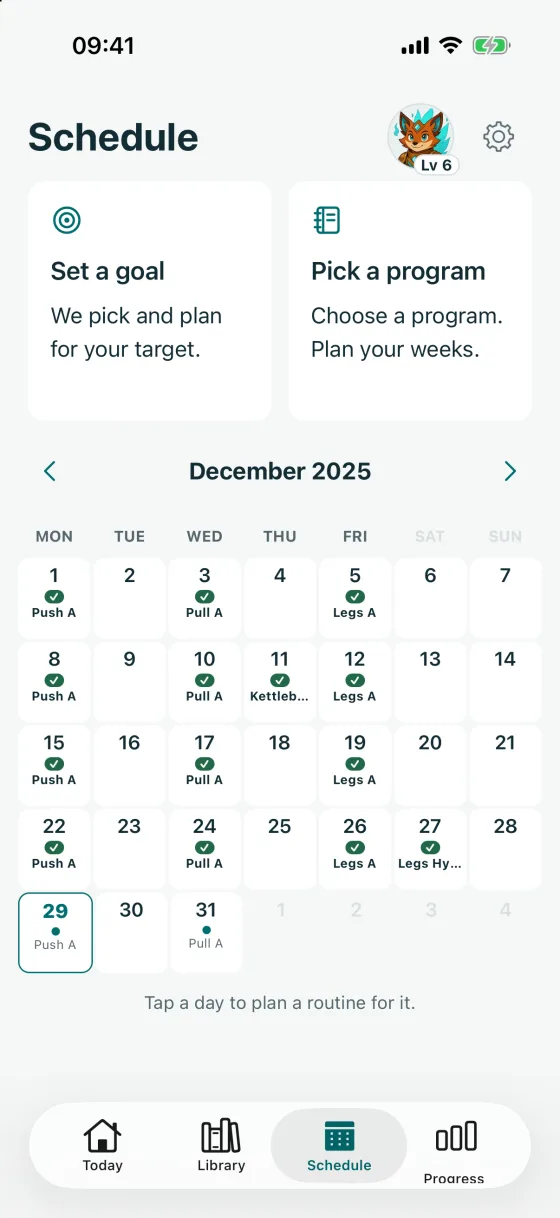
Schedule: two ways to plan, and the month -
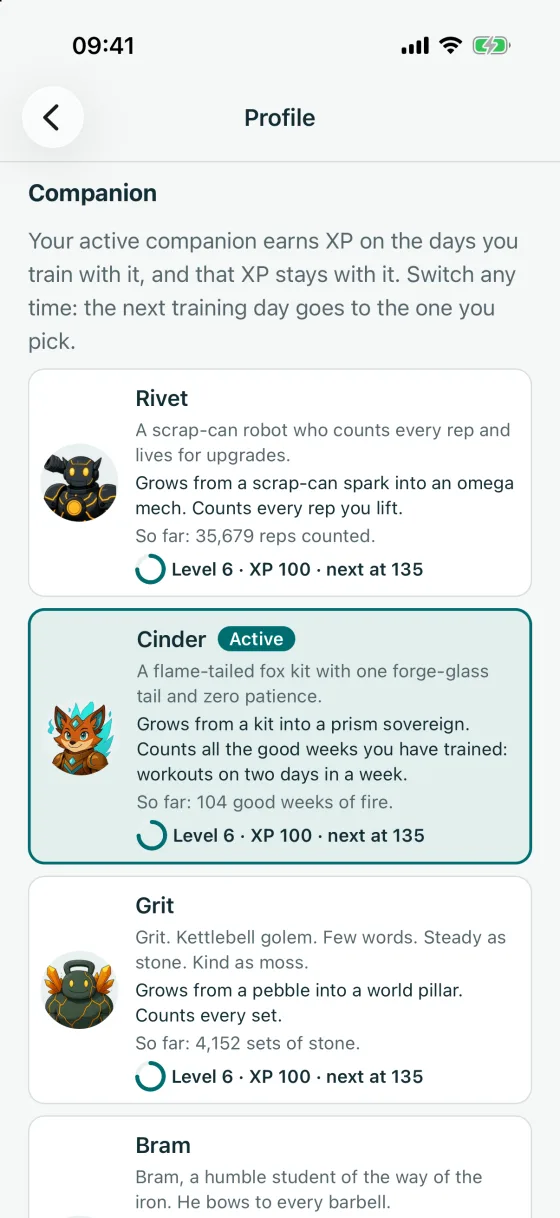
Settings: the companion roster


Your companion
Pick one of eleven companions. It earns XP on the days you train and climbs fifteen levels. Your weight never counts.
Cinder at levels 1, 5, 10 and 15
 Level 1When you pick it
 Level 570 XP
 Level 10270 XP
 Level 15600 XP, the top
A training day earns 10 XP. Hard sets or hard cardio add up to 5 more. Level 2 comes with your first training day, and XP only ever goes up.
The eleven companions at level 15
 Rivet
Rivet- Cinder
 Grit
Grit Bram
Bram Rin
Rin Oren
Oren Lumi
Lumi Kael
Kael Pip
Pip Elowen
 Ash
Ash
In detail
- There are eleven companions, from a scrap-can robot to a flower fairy and a wolf pup. Each has its own voice.
- A training day gives 10 XP. For the bonus, every eight cardio minutes rated 7 or higher count like one set rated 7 or higher; each pair adds 1 XP, up to 5 extra a day. Warm-ups do not count. Level 15 needs 600 XP, which is at least 40 training days for your first companion.
- Each of your first four companions to reach level 15 adds a 15% XP boost for later training days, up to 60%.
- A training day’s XP goes to the companion you had chosen when that day was first counted. Each companion has its own level, and a level only ever goes up.
- Switch any time: the one you leave waits at its level with everything kept.
- Your weight, the weight you lift and how you look never change it.
- Each companion also counts one number of its own, such as sets or good weeks.
- It has a mood. After a break it gets sleepy, but it never scolds you. One workout wakes it up.
- It speaks in a small speech cloud when something happens, like a new record. Double-tap it to open its guide.
- When the app starts, or when you come back after at least 30 minutes away, one companion plays a clip of about two and a half seconds. With Reduce Motion on, it stays still.
Where your data is stored
On your phone. Nothing leaves it unless you connect, switch on or send something yourself.
-
Stays on your phone
Your training log
Every workout, set, weigh-in, goal and setting is saved on your phone. There is no account and no server. We cannot see your data, and we never have a copy.
-
Only if you connect it
Apple Health
On iPhone, Apple Health is off until you connect it. Then the app can read your weight, a few body details and cardio from other apps. It adds your finished workouts and weigh-ins to Health. You choose what it may read, and you can disconnect at any time.
-
Only if you turn it on
Crash reports
Crash reports are off unless you switch them on in Settings. If you do, a crash sends a technical report to Sentry, a crash service hosted in the EU. It holds the error, your device model, the system and app version, device state such as free memory and language, and a random ID that links reports from the same installation. It keeps no trail of the screens you used, and the app does not attach your workout log, your body metrics or your Health records.
-
Only if you send it
Backups, spreadsheets and sharing
The app saves backups inside itself, on your phone. You can also make a spreadsheet of your log, share a routine you made, or share a progress card. You choose where a shared file goes, for example email or AirDrop. Your phone’s own backup service may keep a copy of the app’s data too.
There are no adverts, no analytics and no tracking in the app. Reminders are set on the phone itself, so we never know when one goes off. The full detail is in the GymTracker privacy policy.
What it does
Open “In detail” under any group for the full list.
-
Log a workout
Tick off each set as you go. The app keeps count.
In detail
- Each set records the weight and the reps. You can also give it a Difficulty from 5 to 10, in half steps. It is optional. The app suggests your previous rating or the routine’s target when it has one; otherwise it starts at 8.
- Ticking a set starts a rest timer. It aims for 90 seconds on big lifts and 60 on single-muscle moves. You can change it.
- Mark a set as a warm-up. It stays in your log but never counts toward records.
- For runs, rides, rows, swims and walks, log the time and distance. The app shows your pace, and keeps your longest distance and fastest pace. Difficulty uses cardio words here, from light to all-out.
- Nothing planned today? Quick Start begins any routine.
- On iPhone, your workout shows on the Lock Screen and in the Dynamic Island. On iOS 17 or later you can log the set, skip a rest or add 30 seconds from there.
- When a rest ends with your phone locked, you get an alert. On iPhone it stays quiet if the ring/silent switch is on silent. If you like, the app can also say it out loud.
-
Reminders and extras
Celebrations, optional reminders and a glossary.
In detail
- A small celebration when you set a personal record, in lifting or cardio, or reach a streak milestone.
- Seasonal looks for eleven festivals and observances in the year, such as Pride, Diwali and Christmas. Only for the ones you tick.
- Optional reminders for a weekly weigh-in and the weekly check-in, and a note after two weeks without a workout.
- A built-in glossary explains the terms the app uses.
- It all works without internet.
-
Plan your weeks
Set a goal or pick a program. Your calendar fills in.
In detail
- When nothing is planned, Schedule shows two cards side by side: Set a goal, and Pick a program.
- A goal says what you are working towards, and by when. The wizard asks its questions over five screens, then picks a program to match.
- You choose the days you can train. Sessions only go on those days.
- Tell the app what equipment you have, or pick “just my body”. It only suggests what you can do.
- Missing a piece of kit today? Swap the exercise for one that works the same muscles.
- In Settings › Profile, mark areas to go easy on. The app stops suggesting them and tells you when a plan includes them. It never stops you.
- The calendar marks each day: ✓ done, ✕ missed, ✚ sick day, or skipped.
- A short check-in every seven days asks how the plan is going. It can only change how much cardio you plan, and nothing changes unless you choose.
- A weight goal shows a rough daily calorie figure from your height, weight and age. It is an estimate, not advice, and there is no food diary.
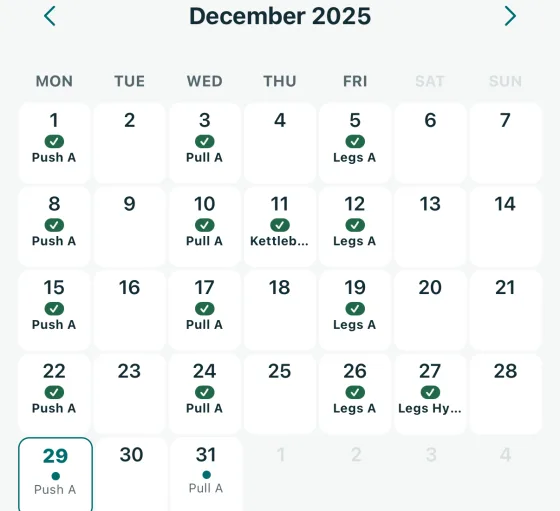
Schedule: trained and planned days -
Find exercises
414 exercises, each with a short demo video.
In detail
- Every built-in exercise has a looping demo clip. The clips are inside the app, so they play without internet.
- A body figure shows which muscles each exercise works.
- Each exercise is marked Compound, Isolation or Cardio.
- Search the Library for exercises, routines and programs in one box.
- Use the built-in routines and programs, or copy one and make it your own.
- Add your own exercises and routines.
- Share a routine or program you made with a friend as a small file. It holds the names you typed, the exercises and their order, the sets, reps or cardio minutes, the Difficulty, and for a program the planned weekdays. Your own exercises travel with their names and muscle groups. Your logged workouts are left out.
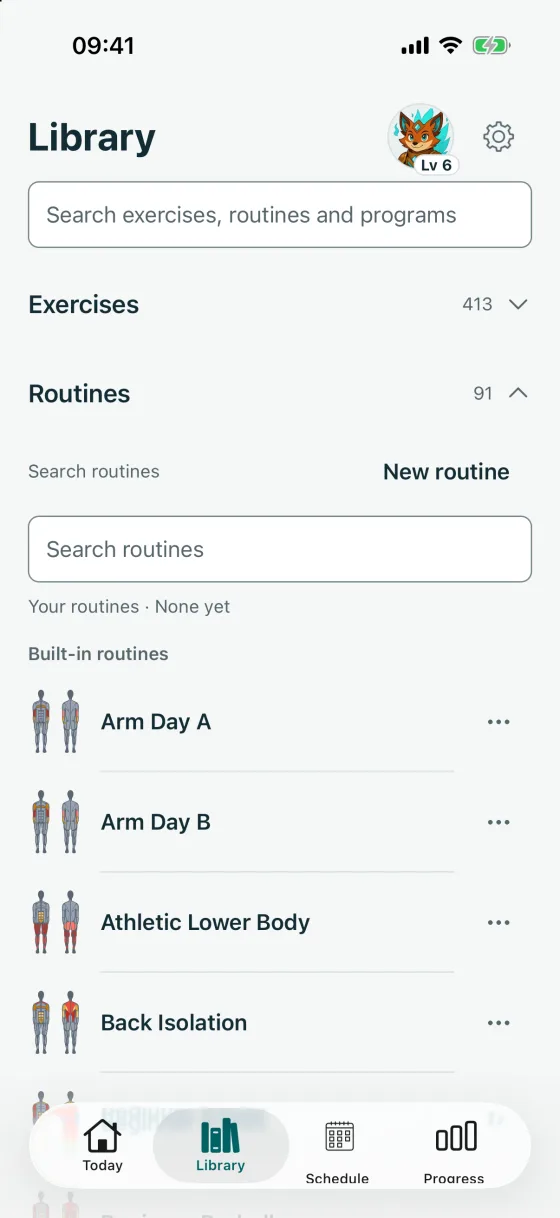
Library: built-in routines -
See your progress
Charts of the work you have done.
In detail
- Last 7 days: one bar for each day’s work. Drag it to look further back.
- Muscle effort: a front and back body figure. Each muscle is coloured by how much work it got over the last 4 weeks.
- Your companion, with its level and an XP ring that shows how far the next level is.
- Weight chart: your weigh-ins on a timeline, with the normal range for your height.
- Personal records: your heaviest weight, most reps, and estimated one-rep max. For cardio, your longest distance and fastest pace.
- Streaks count the weeks you trained without missing a planned workout. A sick day freezes a streak instead of breaking it.
- Awards: medals and trophies. Once you earn one, it is never taken back.
- A training profile with six readings on one chart.
- Share my progress sends the card as an image. If the image cannot be made, it sends a short message.
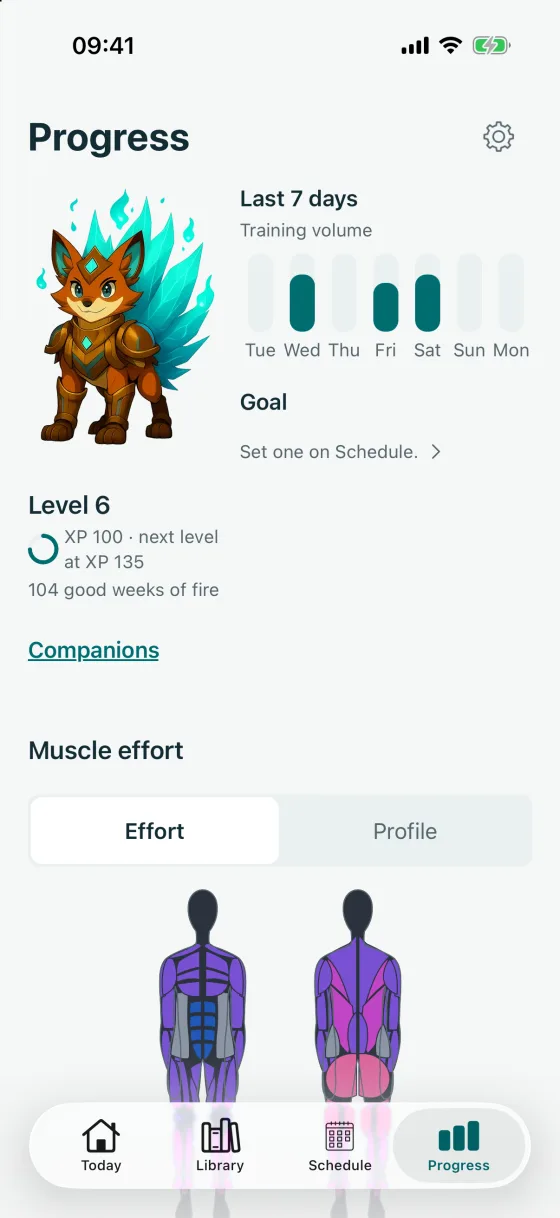
Progress: the companion, XP and the last 7 days -
Backups and export
Back up, restore, and take your log with you.
In detail
- The app backs itself up a few seconds after you log or change a set. It keeps the last 7 backups inside the app, where the Files app does not show them.
- Tap Back up now in Settings whenever you like.
- Restore replaces GymTracker’s current data with a backup. It saves a rescue copy of what was there first.
- Export a spreadsheet of everything you have logged. Email it, or save it to Files.
- Import a spreadsheet the app made, on this phone or a new one. It adds new workouts, sets, weigh-ins and your own exercises and routines. The spreadsheet also holds goals, programs, the calendar, your profile and settings, but importing it does not restore them.
- On iPhone, connect Apple Health if you want to, and disconnect it at any time.
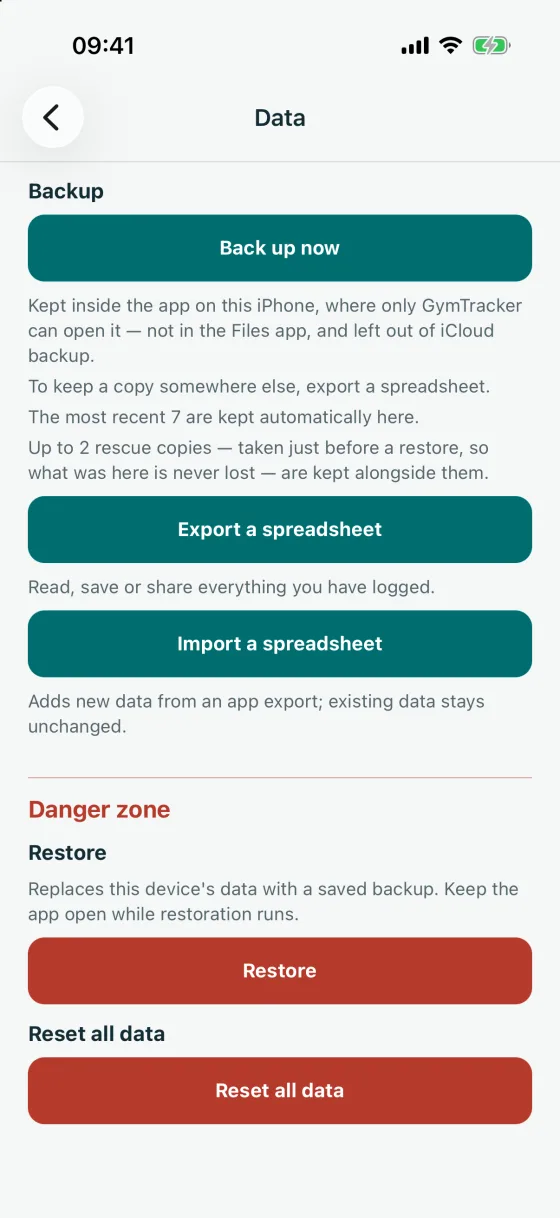
Settings: Data


Who GymTracker is for
A good fit if you
- want a workout log that stays private
- lift weights, do cardio, or both
- train at a gym, at home, or with just your body
- are just starting out, or have trained for years
- want to see your training over time
Not the right app if you want
- a social feed, or to follow friends online
- a personal coach or medical advice
- to log your food or count calories
- your data in the cloud, shared across devices
Questions
Do I need an account?
No. You open the app and start. There is nothing to sign up for, and we never ask for your email.
Where is my data kept?
On your phone. We never receive your workout database. If you turn on crash reports, we receive technical reports through Sentry. Your phone’s own backup may keep a copy of the app’s data. Files leave your phone only when you export a spreadsheet or share a routine or a progress card.
Does it work without internet?
Yes. Everything works offline, including the exercise videos.
Does it use Apple Health?
Only if you connect it. It can then read your weight, a few body details and cardio from other apps. It can also add your workouts and weigh-ins to Health. You choose what it may read, and you can disconnect at any time.
What if I lose my phone, or get a new one?
We cannot get your data back for you, because we never have it. Your phone’s own backup includes the app’s data. To keep a copy somewhere else, export a spreadsheet. On a new phone, import that spreadsheet to bring back your workouts and weigh-ins. The spreadsheet holds your goals, programs and settings too, but importing does not restore them.
Is it medical advice?
No. GymTracker is for general fitness. It does not check injuries. If you are injured, ill or pregnant, talk to a doctor before you start or change your training.
How much does it cost?
The app works in full for 14 days, counted by the app from the first launch. After that, you need a subscription to start a workout or log a set. GymTracker Monthly costs £4.99 a month. GymTracker Yearly costs £29.99 a year. These are UK prices, and prices vary by country. Without a subscription, you can still see your history, Progress and companion, and export your data. The subscription renews until you cancel it. To cancel, open the Settings app, tap your name, then tap Subscriptions.
How do I get help?
Email gymtracker_support@kalikoutsi.com, the same address you find under Settings › About. Inside the app, the glossary explains every term in plain words.